Appendix C: The Evaluation Platform
The experiments were run and inspected through the Magic Tower AI Lab, a web platform built for this thesis (Section 5.8). This appendix describes its structure, its pages and how it supports reproduction. The screenshots were captured automatically from the running platform.
C.1 Structure
The platform consists of the Python framework, a web server and a browser front end (Figure C.1). The framework contains the engine, the evaluation loops of Chapter 5, the repeated-episode harness and the prompt optimiser. The server, written with FastAPI, exposes the framework through 58 API routes, two routes that serve the front end and one WebSocket endpoint. The front end is a statically exported Next.js application with eight pages: Live, Play, Maps, Experiments, GEPA, Logs, Reference and Projects.
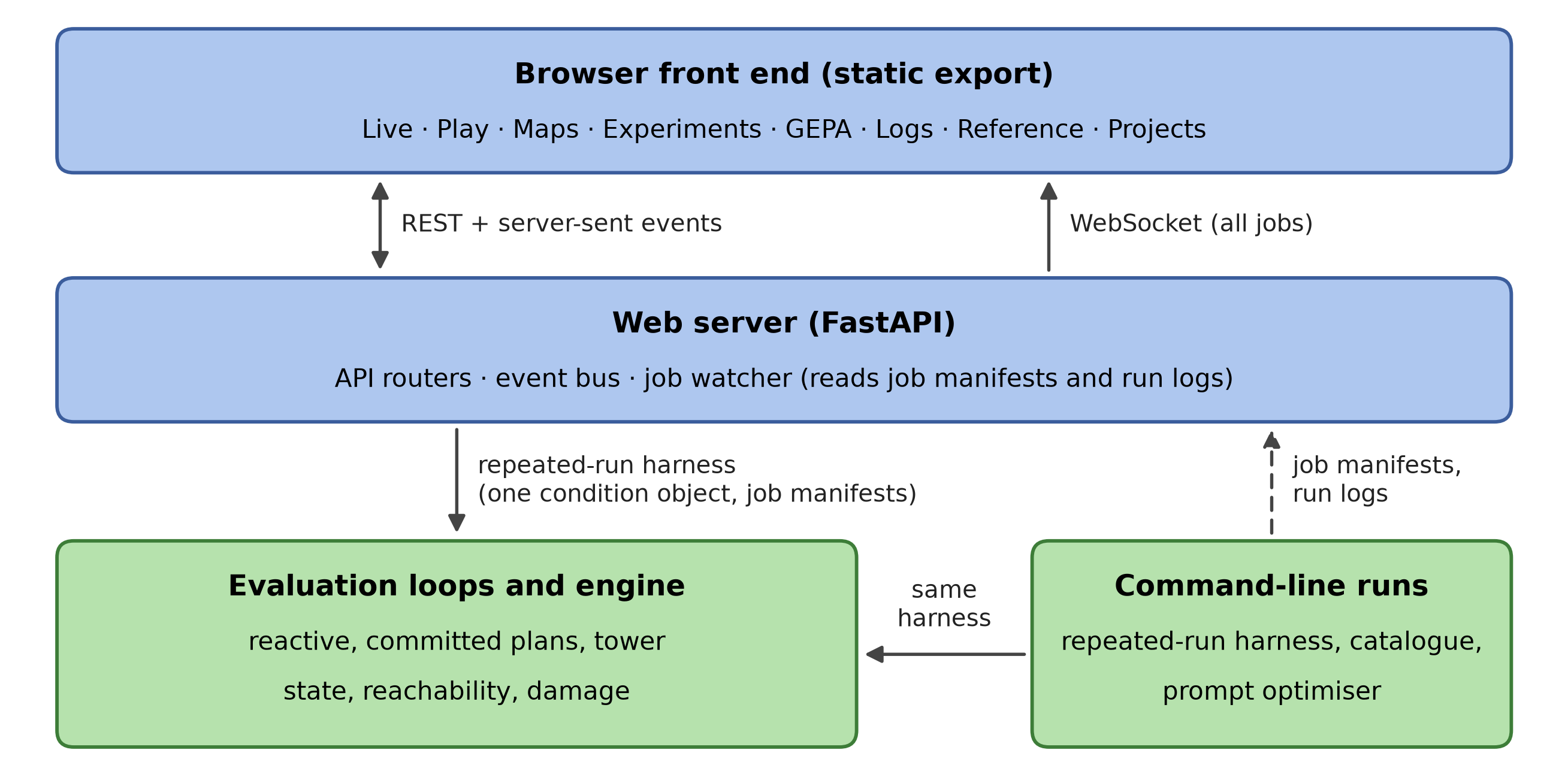
Figure C.1: Structure of the platform. Runs started in the browser and runs started from the command line use the same harness and write the same files; the server's job watcher reads the job manifests and run logs of command-line runs.
Every condition of the command-line harness (floor, model, prompt, planning mode, lookahead depth, engine settings, number of episodes) is also available in the browser through the same condition object.
C.2 Observing and Replaying Runs
Runs started in the browser stream their events (reasoning chunks, turns, floor changes, result) to the page as they happen. Runs started from the command line register a job manifest with their label, command line, condition, progress and current run log, and write their run log after every turn. A watcher in the server reads both and republishes every new event on an event bus, to which the browser subscribes over one WebSocket. The Live page (Figure C.2) therefore shows every running experiment, including a tower run of several hours started from a terminal, with its map, hero attributes and reasoning at each turn. Jobs can be paused and resumed between turns and stopped.
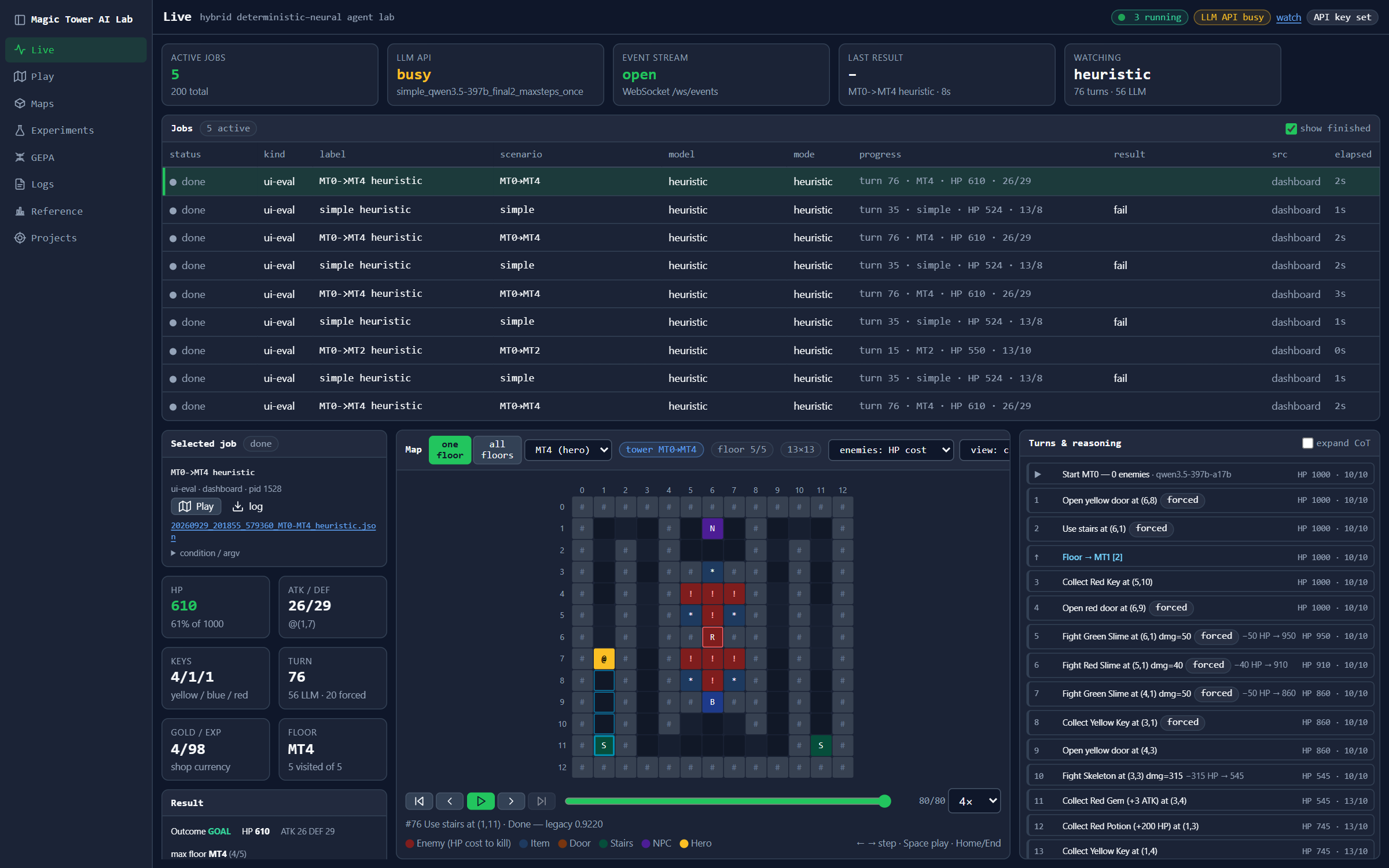
Figure C.2: Live page. The job registry lists every running and finished job with its label, floor, model, progress and result; the selected job's map, attributes and turn cards are mirrored from its run log.
The Play page (Figure C.3) shows one episode. The map is the central element; around it are the hero's attributes, playback controls and one card per turn. Each card shows the text sent to the model, the model's reasoning and answer, the executed action and, where applicable, the engine's override with the model's original choice. In manual mode, a person plays through the same interface as the model: every legal action is ringed and numbered on the map, and clicking a tile takes that action, which makes the claim of Section 5.3 directly checkable. The exact solver's route can be replayed on the same map. The Logs page (Figure 5.3) lists every stored episode with its outcome, final HP relative to the optimum and model, replays it turn by turn, and compares two runs on the same floor from their first diverging turn. The Maps page shows every single floor and every tower floor with its exact-solver facts and the tower's scripted events, drawn either with coloured cells or with the original game's tiles.
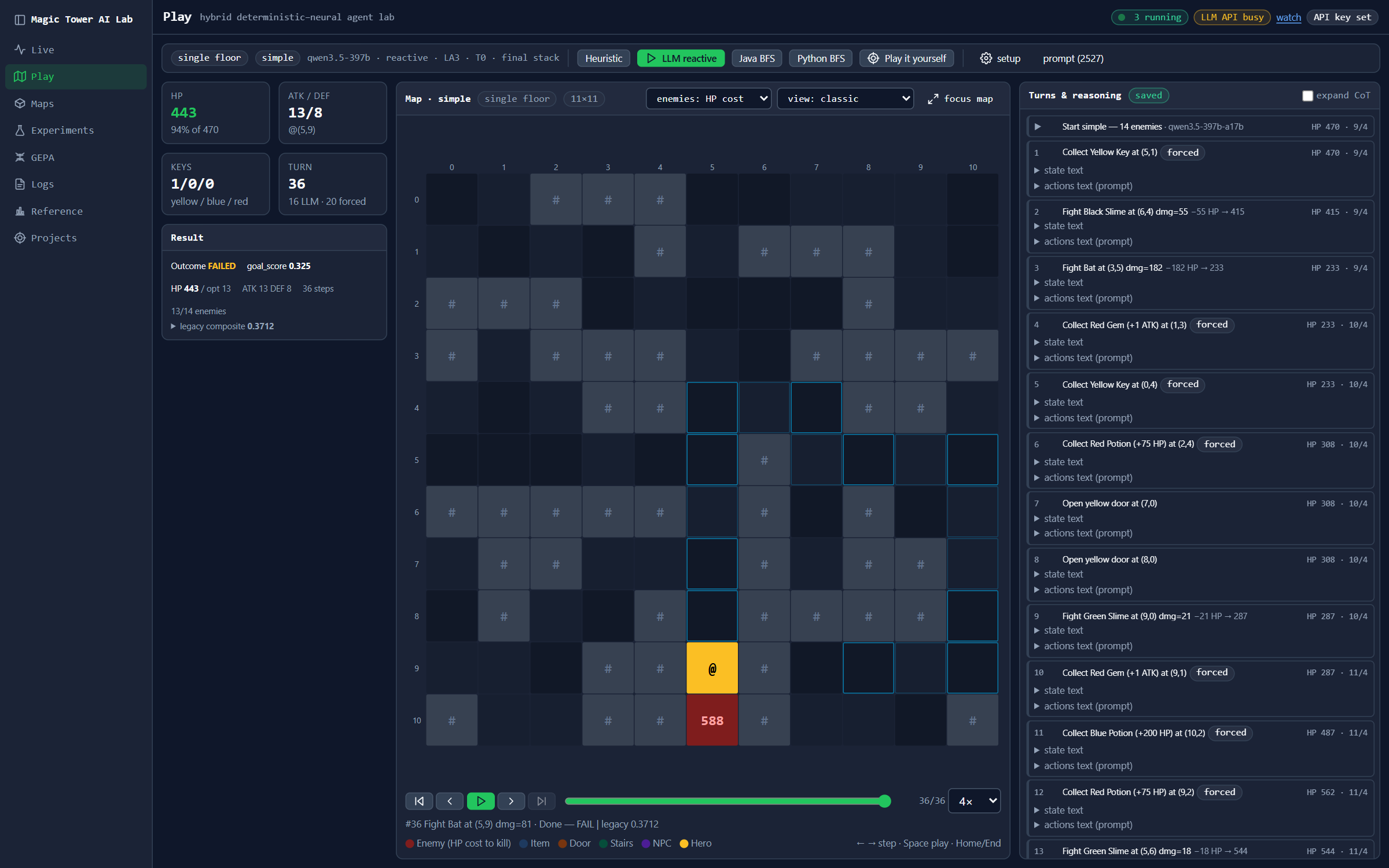
Figure C.3: Play page after a heuristic episode on the simple floor: run settings, attributes and playback on the left, the map in the centre, and the turn cards with the exact observation on the right.
C.3 Experiments and Reproduction
The Experiments page (Figure C.4) lists the experiments of Chapter 6. Its first tab follows Table D.4: for each table, figure and paragraph of Chapter 6 it lists the result files, and for each file the episodes with a link to their replay. A second tab holds catalogue entries with the exact condition of each configuration (floor, model, planning mode, lookahead, prompt, engine settings, ) and the stored result with its Wilson interval. A reader enters an API key for an OpenAI-compatible service; the server holds it in memory only and never writes it to disk or to a log. The reader then selects entries, optionally limits the number of episodes, and starts them. Each configuration runs with the stored arguments under a new label, so that the thesis results are never overwritten, and the new results appear next to the stored ones. The same catalogue is available from the command line.
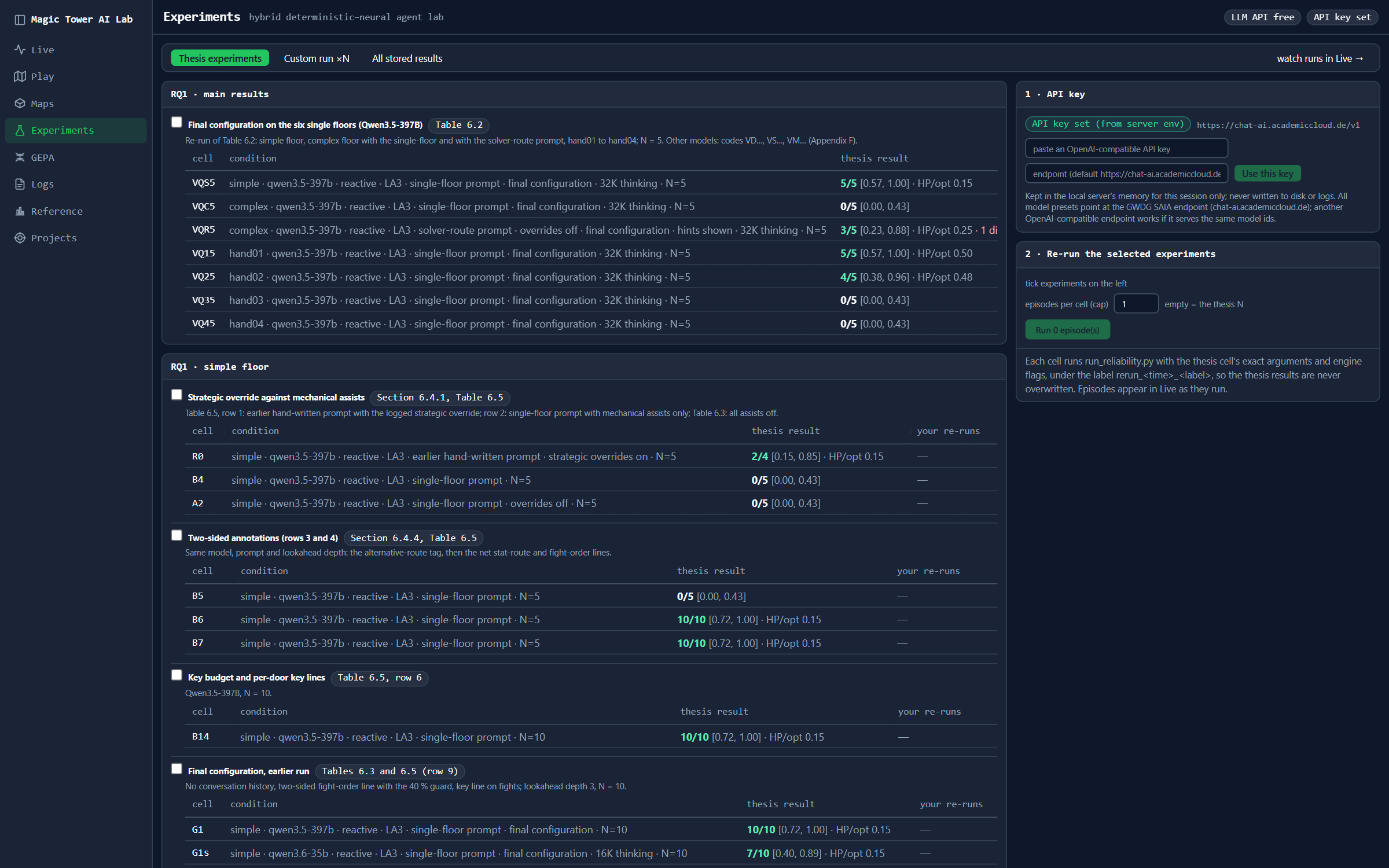
Figure C.4: Experiments page: catalogue entries with each configuration's condition and stored result, the reader's own re-runs, and the panel for the API key and re-runs.
C.4 Prompt Optimisation
The GEPA page (Figure C.5; named after the method of Section 2.6.1) lists every stored run of prompt evolution (Section 5.7) and shows the runs of the (1+1) loop iteration by iteration. For each candidate it shows the score, whether it was kept, the outcome on each training floor with a link to the replay, the prompt as a line-by-line difference from its parent, the teacher's diagnosis and the validator's verdict.
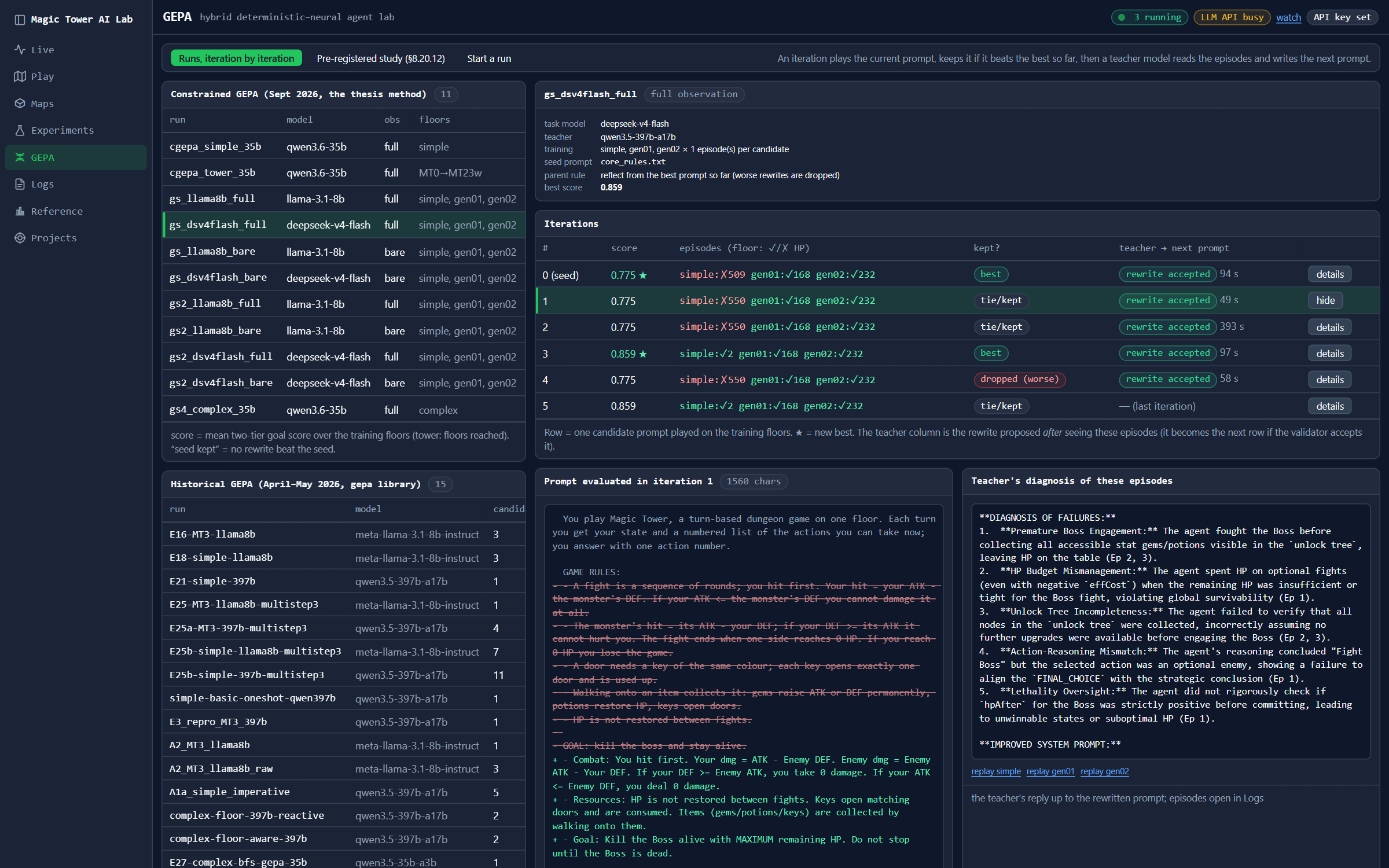
Figure C.5: GEPA page: the runs of the study and one run opened iteration by iteration, with the first rewrite shown as a difference from the seed and the teacher's diagnosis.
C.5 Logging and Tests
Every episode writes one JSON log with, for each turn, the hero's state, the observation sent to the model, the model's answer and reasoning, the executed action, every override and assisted turn, and the job that produced it. The log is written after every turn, so an interrupted episode leaves a replayable partial log. Because the engine is deterministic, every action sequence in a log can be replayed exactly. Each result file names the run log of every episode, and the run logs are archived as a release asset of the public repository (Appendix D).
Regression tests need no API access. They pin the engine's rules, the route contracts of the server, the four single-floor baselines of the heuristic, the job registry, and the exact text of the observation at a reference decision. A browser test opens every page and checks its layout at several screen sizes.